May 11, 2026 • Declan Merritt • 9 min reading time • Prices verified June 17, 2026
Phone Gimbals for Content Creators: What the Specs Don't Tell You
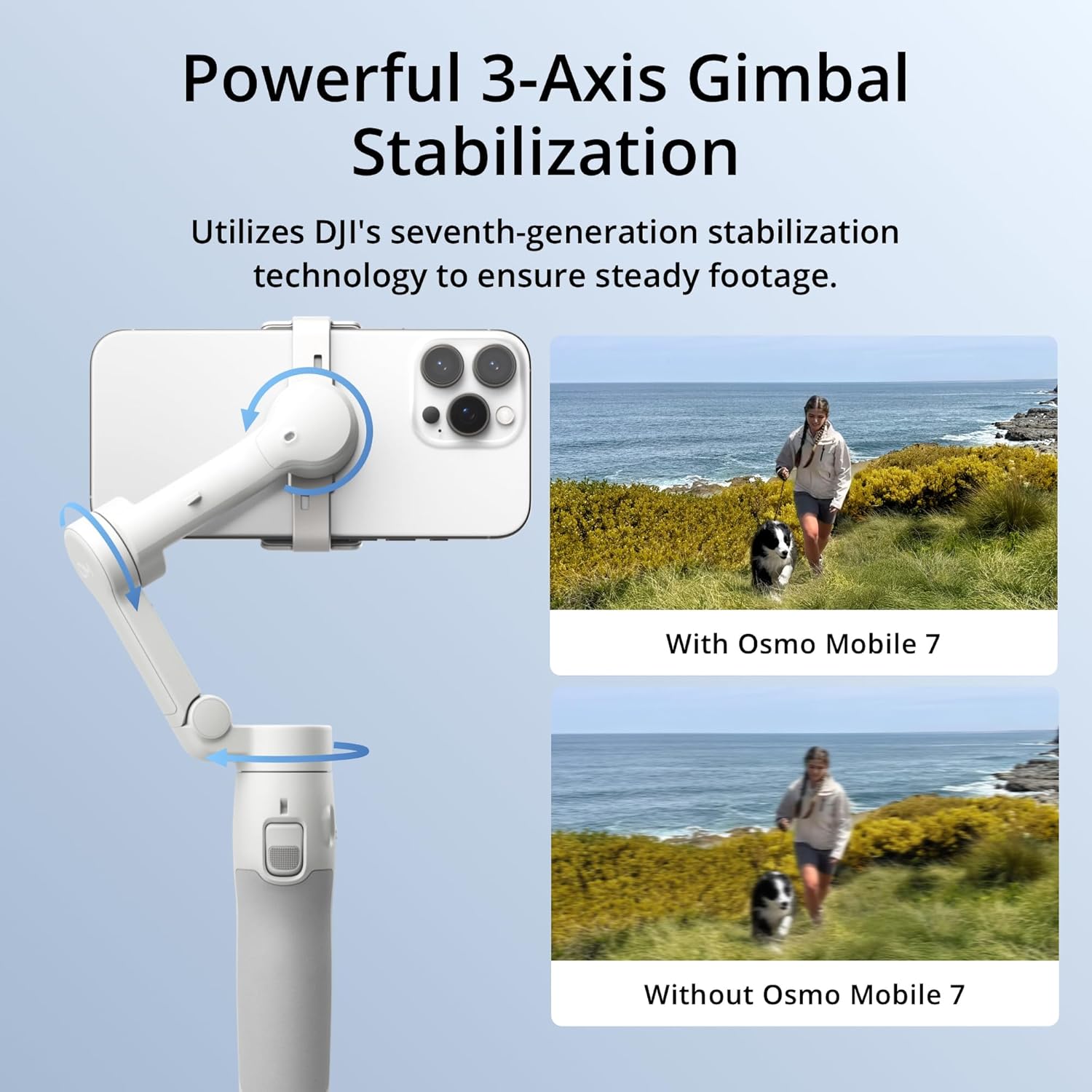
A phone gimbal is a motorized handheld device — think of it as a small robotic arm — that keeps your smartphone camera level and smooth while you’re moving. The three motors inside it constantly correct for the shakes and tilts your hands naturally introduce, so footage that would otherwise look like a chase scene comes out looking calm and deliberate. If you’ve ever watched a creator walk and talk on camera without the frame bouncing around, there’s a very good chance a gimbal made that possible. This guide is for people who’ve already decided a gimbal is the right tool and now need to figure out which one — because the number on the spec sheet marked “payload” and the number that actually matters for your phone-plus-case setup are not always the same thing.
You’re probably somewhere between your first stabilized shot and your tenth client deliverable. You know what axis compensation means. You may have already returned one gimbal. This article is about the gaps between what manufacturers publish and what operators in long-run reviews consistently flag as the real deciding factors — payload math, balancing behavior, app ecosystems, and the moment it makes more sense to rent than own.
| EDITOR'S PICK[FeiyuTech Official SCORP Mini 2…](https://www.amazon.com/dp/B0CRB8D5PV?tag=greenflower20-20) | Mid-tier[DJI Osmo Mobile 7P Gimbal Stabi…](https://www.amazon.com/dp/B0H1FG56M9?tag=greenflower20-20) | Budget pick[DJI Osmo Mobile 7 Gimbal Stabil…](https://www.amazon.com/dp/B0H1FG56M9?tag=greenflower20-20) | |
|---|---|---|---|
| Phone compat | — | iPhone, Android | iPhone, Android |
| Battery life | — | 10hrs | 10hrs |
| Built-in tripod | — | ✓ | ✓ |
| AI tracking | ✓ | — | — |
| Touchscreen | ✓ | — | — |
| Price | $135.88 | $99.00 | $59.00 |
| See on Amazon → | See on Amazon → | See on Amazon → |
The Payload Number Is a Starting Point, Not a Promise
Every phone gimbal ships with a maximum payload spec. The DJI OM 6 is rated at 290g. The Zhiyun Smooth 5S publishes a 300g ceiling. Those numbers aren’t dishonest — but they’re measured with the gimbal balanced under ideal conditions, usually without a case, a MagSafe mount, a clip-on wide lens, or any accessory weight sitting off-axis.
Here’s the math that actually matters:
Quick payload reality check:
- Flagship smartphone (e.g., iPhone 16 Pro Max, bare): ~228g
- Average protective case: +35–55g
- Clip-on anamorphic or wide lens: +45–90g
- Cold shoe mic or light: +30–80g
- Realistic total: 338–453g
That puts you over the published ceiling of most sub-$150 gimbals before you’ve mounted a single accessory. You’re not doing anything wrong — the spec just isn’t accounting for how people actually shoot.
What goes wrong when you exceed payload isn’t always a total failure. Per Cinema5D’s smartphone stabilizer roundup, operators more commonly report a subtler problem: the gimbal’s motors work harder to hold position, battery life drops noticeably, and micro-corrections become visible in slow-motion review as a faint “hunting” vibration rather than clean locked movement. The motor strain shows up in your footage before it shows up as an error message.
The practical rule: add 20–30% overhead above your real loaded weight when selecting a gimbal. If your phone-plus-case-plus-lens stack lands at 330g, look for a gimbal rated at 400g or above. The Zhiyun Smooth 5S and the DJI RS line’s smartphone mount adapters both give you that headroom, though the RS system introduces its own tradeoffs (more on that below).
Balancing Behavior: The Spec Sheet Goes Silent Here
Manufacturers list payload. Almost none of them tell you how difficult the balancing process is, how forgiving the design is when you’re slightly off-axis, or whether the gimbal even requires manual balancing at all.
This is the single most underweighted variable in buying decisions at this tier, according to aggregated operator reviews on B&H Photo and in No Film School’s buyer’s guide coverage. There are two camps:
Magnetic-mount gimbals (DJI OM series) use a MagSafe-compatible clamp that snaps your phone to a pre-defined center point. You don’t balance — you attach and go. That’s a genuine workflow advantage when you’re switching between shots quickly or sharing a gimbal between operators with different phones. The tradeoff is that the magnetic mount only works well with phones close to the sweet spot weight; heavier setups push the motor into strain territory faster, and there’s no manual fine-tuning available.
Traditional clamp gimbals (Zhiyun Smooth series, Hohem iSteady series) use adjustable arms and require you to physically slide the phone to the balance point before powering on. It takes 90 seconds with practice and 5 frustrating minutes your first few times. But once balanced, owners consistently report that the motors run cooler, battery life holds more predictably, and the gimbal handles top-heavy or offset loads — like a clip-on lens — far more gracefully.
The decision frame here is straightforward: If speed of deployment and ease of handoff matter more than flexibility in loadout, go magnetic. If you’re regularly shooting with accessories or expect your phone to change, learn to balance.
App Ecosystems and the Lock-In Tax
Phone gimbals have become software products as much as hardware products. The DJI Mimo app, Zhiyun’s ZY Cami platform, and Hohem’s app each unlock features — object tracking, timelapse modes, shot templates, AI crop and reframe — that don’t work without the paired software. That’s fine until you realize what it means for your long-term workflow.
No Film School’s coverage of smartphone production tools has noted that DJI Mimo’s ActiveTrack subject-following system is meaningfully more reliable than third-party alternatives in variable lighting, and that it integrates directly with the OM series gimbal hardware in a way competitors haven’t fully replicated. But it also means your stabilized tracking workflow is built on a single vendor’s software roadmap. DJI has a strong track record of multi-year support, but operators who’ve been in this long enough remember when the original Osmo app changed update patterns after hardware generations cycled.
Zhiyun’s ZY Cami has expanded significantly in 2025, adding AI-assisted framing modes that reviewers at Cinema5D describe as “competitive but narrower” — functional for the core use cases, still catching up on edge cases like multi-subject tracking in crowds.
What this means practically: Before buying, check whether the gimbal’s headline feature — the one that sold you on it — lives inside the app or in the hardware. Motor stabilization is hardware. Tracking, story modes, and auto-editing are software. Hardware depreciates predictably. Software support is a relationship.
Buy vs. Rent: When It Actually Makes Sense to Rent a Phone Gimbal
This will sound counterintuitive because phone gimbals are cheap relative to the rest of your kit. A DJI OM 6 retails around $159 as of mid-2026. Renting one from a local house typically runs $25–40/day. The crossover math on ownership is fast — most operators hit break-even inside 5–6 rental days, which is two or three short projects.
So ownership almost always wins on pure economics. But there are two scenarios where renting a premium smartphone rig makes more sense than buying one outright:
1. One-off shoots with specific platform requirements. If a client specifies vertical delivery optimized for a specific capture workflow — say, a high-volume social campaign shot on a Zhiyun Smooth 5S with their proprietary shot templates — renting the exact unit avoids the learning curve on a new gimbal system during a paid job.
2. You’re evaluating before committing. Renting a Zhiyun Smooth 5S for a weekend costs roughly what it costs to return-ship a gimbal you ordered and disliked. Per B&H Photo’s rental guidance for camera support gear, rental returns on gimbals spike in the 90-day window after major product launches — a pattern that strongly suggests people are buying on spec and discovering balancing or app compatibility issues afterward. Renting first eliminates that.
The “buy vs. rent crossover point” for phone gimbals is low enough that most working creators should own one. The exception is when a specific feature on a higher-end unit (the Zhiyun Smooth 5S’s fill light system, for example, or a mechanical follow-focus integration) is required for a single deliverable.
The Features That Actually Separate Good Gimbals from Forgettable Ones
Reviewers at Wirecutter and Cinema5D, across multiple rounds of smartphone gimbal coverage, keep surfacing the same cluster of features as the real differentiators — not the spec-sheet numbers:
Battery life under load. Published battery specs are measured at moderate motor demand. Operators running continuous tracking or shooting in cold weather consistently report 25–40% shorter real-world life than rated. Look for USB-C passthrough charging — the ability to power your phone from the gimbal’s own battery while shooting — as a safety net.
Follow mode smoothness. “Follow mode” is the setting where the gimbal slowly tracks your pan and tilt movements rather than locking to a fixed horizon. The smoothness of this follow curve is entirely a function of motor tuning and firmware, not payload spec. Owners across aggregated reviews consistently flag Zhiyun’s follow curve as slightly more natural-feeling for walk-and-talk formats, while DJI’s is tuned stiffer by default — better for stationary tracking shots.
Physical control layout. Three-axis phone gimbals all have a joystick and a trigger. What varies is how quickly you can switch modes without pulling out your phone. The DJI OM 6’s single-button mode cycling gets consistent praise in operator reviews for letting you move between sport mode and follow mode with one thumb during an active shot.
Cold shoe and accessory mounting. A 1/4-20 thread on the handle is table stakes. An actual cold shoe mount — the standard bracket for attaching a microphone or small LED light — is only present on mid-tier and above gimbals. If your workflow includes even a small on-axis light, confirm cold shoe before purchasing.
The Decision Frame
Here’s where this lands for an operator currently choosing between options:
- If your phone weighs over 230g bare and you shoot with any accessories: Don’t buy to the ceiling of a 290g-rated gimbal. Budget up to the Zhiyun Smooth 5S tier or look at gimbal adapters that interface with a proper 3-axis camera gimbal (DJI RS 3 Pro with a smartphone plate).
- If fast deployment and MagSafe compatibility are your primary requirements: The DJI OM 6 is the spec-and-ecosystem fit. Wirecutter’s phone gimbal coverage has consistently named the OM line as the default recommendation for solo creators in this workflow.
- If you’re doing follow-mode walk-and-talk content regularly: Rent a Zhiyun Smooth 5S for one project and evaluate the follow curve yourself before committing — the difference is real and reviewers at Cinema5D consider it the primary deciding factor between the two platforms.
- If you’re building toward a hybrid phone-and-mirrorless workflow: Consider skipping a dedicated phone gimbal entirely. A DJI RS 3 Pro with a smartphone mounting plate covers both use cases and eliminates a second gimbal system from your kit.
Your next step: check the B&H Photo phone gimbal category listing — bhphotovideo.com — which includes current street pricing and a side-by-side spec comparison tool across the major platforms. Filter by payload, then work backward from your real loaded weight.