May 27, 2026 • Declan Merritt • 9 min reading time • Prices verified June 17, 2026
Slider, Gimbal, or Jib: Choosing the Right Tool for Your Shooting Style
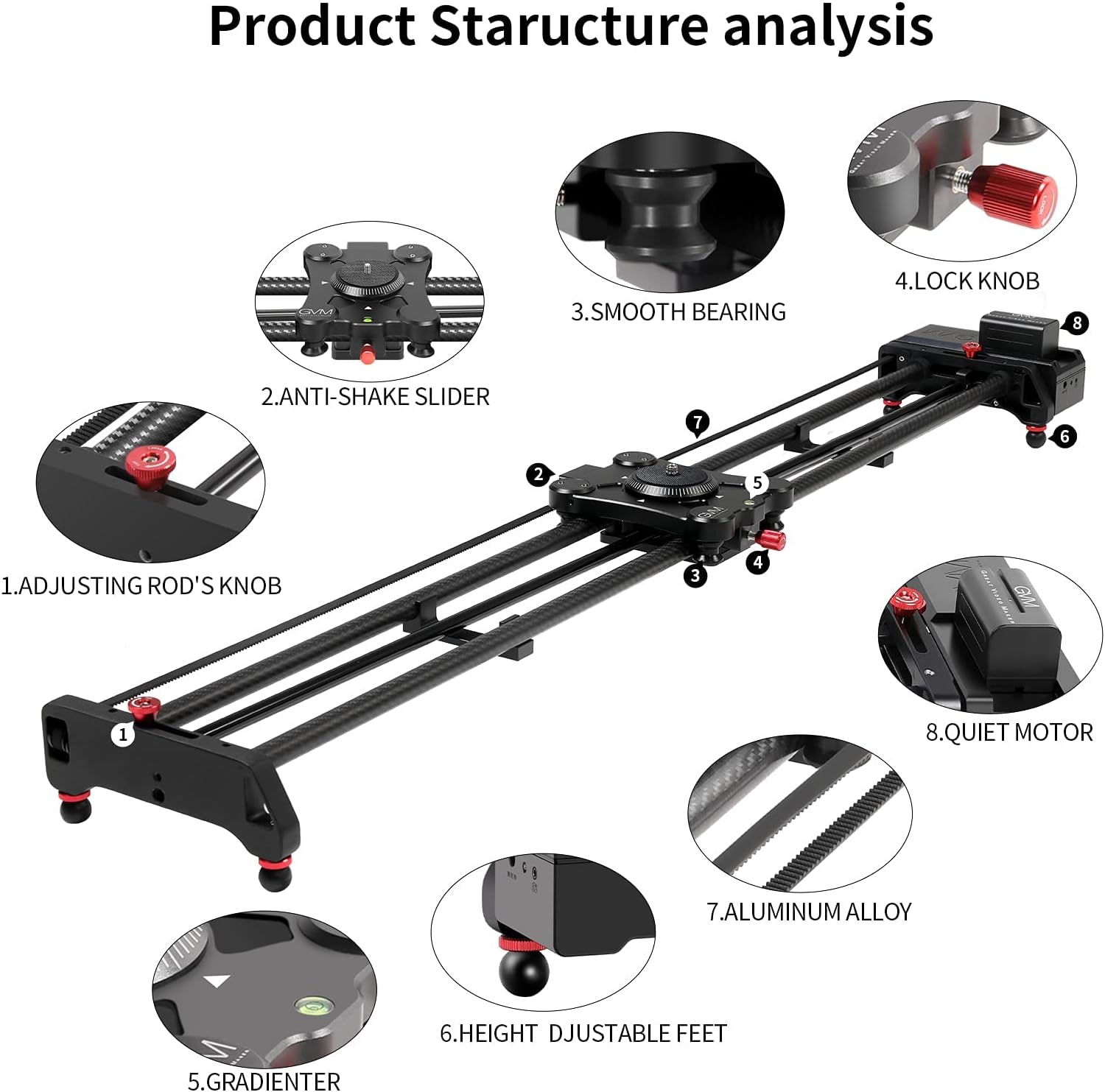
If you’ve ever stood on a location wondering whether to pull out your slider or reach for your gimbal, you’re not overthinking it — these tools genuinely do different things, and picking the wrong one costs you more than just time. A slider is a rail-mounted track system that moves your camera horizontally or vertically in a perfectly smooth, mechanically constrained line. A gimbal is a motorized stabilizer that holds your camera level while you walk, run, or arc around a subject freely. A jib (sometimes called a crane arm) pivots from a fixed point to sweep your camera up, down, or across a wide arc in space. Each creates a distinct visual grammar. This guide will help you figure out which one belongs in your kit, which one you should rent for a specific job, and — critically — when you need more than one.
| EDITOR'S PICK[IFOOTAGE Shark Slider Nano II 6…](https://www.amazon.com/dp/B0DK6XZGYN?tag=greenflower20-20) | Mid-tier[GVM Motorized Camera Slider](https://www.amazon.com/dp/B09CL2XWY1?tag=greenflower20-20) | Budget pick[Vidpro SK-22 Professional Skate…](https://www.amazon.com/dp/B00DCZL4K0?tag=greenflower20-20) | |
|---|---|---|---|
| Max Payload | 15.4 lbs | — | 25 lbs |
| Motorized | ✓ | ✓ | ✗ |
| Material | — | Carbon Fiber | — |
| Length | 26" | 31" | — |
| Panoramic | 360° | 120° | — |
| Compatible Gimbal | DJI RS 2/3/4 Pro | — | — |
| Price | $699.00 | $239.00 | $41.00 |
| See on Amazon → | See on Amazon → | See on Amazon → |
What Each Tool Is Actually Doing to Your Image
Understanding the mechanical logic behind each tool is the fastest shortcut to knowing when to reach for it.
Sliders constrain motion to a single axis. The camera moves in a straight line, period. That constraint is the whole point: it produces the kind of clean, measured lateral movement that reads as intentional and controlled on screen. No Film School’s definitive guide to camera movement describes the slider as the tool of choice when you want to “reveal information progressively” — sliding past a foreground element to expose a background, or tracking parallel to a subject to give a sense of shared pace. The mechanical precision also makes sliders the right answer for any workflow involving motion control or repeat passes, including time-lapse and product photography, because the move is repeatable down to the millimeter.
Gimbals do something categorically different. They stabilize, but they don’t constrain. You’re still the locomotion engine — the gimbal just removes the unwanted shake and tilt from however you’re moving. PremiumBeat’s article “When to Use a Gimbal vs. a Slider” makes the distinction cleanly: a gimbal excels at following subjects through dynamic environments, walking through doorways, tracking athletes, or floating through a crowd, because it absorbs chaos while keeping the horizon locked. The tradeoff is that gimbals introduce a characteristic “floating” quality that experienced viewers recognize immediately. In narrative work, that quality reads as subjective and present-tense. In corporate or documentary work, it can read as casual or even underprepared, depending on how it’s executed.
Jibs operate on a different logic entirely. A jib arm pivots from a fixed fulcrum, giving you a sweeping arc — typically up-and-over or side-to-side — that neither a slider nor a gimbal can replicate. ProVideoCoalition’s article “Jibs and Cranes: What You Need to Know” notes that the jib’s visual power comes from changing the camera’s relationship to gravity in a way that feels inherently cinematic. A jib-down onto a subject communicates arrival, consequence, or surveillance. A jib-up at the end of a scene signals release, scale, or transition. That’s not something you approximate with a track or a stabilizer.
The Decision Frame: Matching Tool to Shooting Condition
Here’s where practitioners get into trouble: treating these tools as interchangeable upgrades rather than as specialists. The better mental model is to ask what constraint your shot actually requires.
Use a slider when:
- Your subject is static or moving predictably on a known axis
- You need a repeatable move (time-lapse, product, multi-camera composite)
- You want precise, deliberate parallax between foreground and background
- Your setup allows for a fixed camera position for at least 2–3 minutes
Use a gimbal when:
- You’re following unpredictable or fast-moving subjects
- Your location prevents dolly track or slider setup (stairs, uneven terrain, tight interiors)
- The production style calls for an observational, run-and-gun aesthetic
- You need to transition between static and moving shots quickly without a second operator
Use a jib when:
- The shot language requires vertical or wide lateral arc movement
- You’re establishing a location, ending a scene, or need a God’s-eye perspective transition
- Your production has a fixed camera position budget (jib arms are slow to reposition)
- Payload and reach justify the setup overhead — typically 6-foot-and-above arms in the Tilta Hydra Alien or Dana Dolly crane configurations
The scenario where practitioners overspend is buying a high-end gimbal for all three use cases. Operators across long-run reviews on Cinema5D consistently note that the DJI RS 3 Pro is an outstanding stabilizer but a poor substitute for a slider when the shot calls for mechanically precise lateral travel. The floating quality bleeds into shots that should read as locked.
By the Numbers: Quick Spec Reference (2026 Market)
| Tool | Typical Payload Range | Setup Time | Move Repeatability | Starting Price |
|---|---|---|---|---|
| Motorized Slider (e.g., Rhino Arc II) | 15–25 lb | 5–10 min | High (motion control) | ~$800–$1,200 |
| 3-Axis Gimbal (e.g., DJI RS 3 Pro) | 6–10 lb | 2–5 min | Low | ~$500–$850 |
| Entry Jib (e.g., 4–6 ft carbon arm) | 8–15 lb | 10–20 min | Medium | ~$200–$600 |
| Cinema Jib/Crane (e.g., Tilta Hydra Alien) | 25–44 lb | 20–45 min | Medium-High | ~$3,000–$5,000+ |
Payload figures above reflect manufacturer-rated maximums per published product specifications as of May 2026. Always factor your total system weight: body + lens + cage + follow-focus + matte box. A Sony FX3 with a PL-mount lens, a Wooden Camera cage, and a Bright Tangerine matte box can push 7–9 lb before you’ve added wireless video or an onboard monitor. That math changes your gimbal tier and your jib arm choice significantly.
The Ecosystem and Rental Math You Need to Do Before You Buy
This is where the intermediate practitioner usually gets it wrong: committing to a system purchase when rental arithmetic clearly favors a day rate.
Sliders tend to justify purchase quickly if you’re doing any volume of commercial or product work — even 4–6 shoot days per year at a $150/day rental rate recovers the cost of a Rhino Arc II in under two years. The motion control capability, once you’re relying on it for multi-pass compositing or time-lapse, makes ownership almost mandatory. Ecosystem lock-in is real here: Rhino, Edelkrone, and Tilta all use proprietary motion control protocols that don’t cross-talk, so your first motorized slider purchase is also a platform decision. Cinema5D’s coverage of Edelkrone’s SliderPLUS Pro ecosystem notes that the appeal of their link module integration is genuine — but it comes with accessory dependency that makes switching expensive.
Gimbals at the RS 3 Pro / Moza Air 3 tier are almost always a purchase, not a rental. Day rates for this tier have compressed to $75–$125/day in most mid-size markets as of 2026, meaning ownership pays off after roughly 6–8 shoot days — a threshold most working shooters cross in the first year. No Film School’s RS 3 Pro coverage reflects the consensus that at this price point, ownership is straightforwardly rational for any shooter doing more than occasional paid work.
Jibs and cranes are the clearest case for rental-first thinking at the cinema end. A Tilta Hydra Alien package with a fluid head and counterweights represents a $4,000–$6,000 outlay. Unless jib work is a regular line item in your production slate — meaning at least 10–15 shoot days annually — the rental math almost always wins. A single-day rental of a comparable package typically runs $200–$400 through a production rental house, meaning you’d need 12–25 rental days annually just to break even on purchase, before accounting for storage, transport cases, and maintenance.
The buy-versus-rent crossover for jibs also depends heavily on your local rental market. In major production markets (Los Angeles, New York, Atlanta, London), crane and jib inventory is deep and day rates are competitive. In secondary markets, availability can be thin enough that ownership becomes a competitive differentiator rather than a cost question.
Payload Reality Check: The Number Manufacturers Don’t Emphasize
Every tool category above has a payload spec that looks comfortable on paper and gets stressed in the field. The issue isn’t the number — it’s what most shooters forget to include in the weight calculation.
For gimbals: the RS 3 Pro’s 10 lb rated payload sounds generous until you’re running a Sony FX6 with a Sigma 24–70mm Art lens, a SmallRig cage, a wireless follow-focus motor, and an Atomos monitor. That configuration can hit 9.5–10.5 lb depending on accessories. Operators in long-run reviews consistently flag that running a gimbal at or near rated payload degrades motor longevity and increases drift over extended shoot days.
For sliders: the Rhino Arc II’s 25 lb payload is legitimate for the carriage, but the tripod or legs supporting the slider become the limiting factor. A 60-inch slider loaded at 20 lb and supported by mid-range fluid head tripods can introduce micro-vibration in the move that’s invisible on a monitor but visible in post.
For jibs: the counterweight system is the variable most operators underestimate. A jib arm rated for 15 lb at the camera end requires a proportional counterweight at the tail. If you’ve spec’d a head and camera that pushes the arm’s rated maximum, you’ll need more counterweight mass than the arm’s counterweight tray accommodates — a problem that shows up at the rental house or on day one of ownership, not in the brochure.
If X, Then Y: The Decision Rule
You don’t need all three tools in your kit. Here’s how to decide what to prioritize:
If your work is primarily narrative or commercial with controlled setups: Start with a motorized slider. The repeatability and motion control capability create production value that gimbals can’t replicate in these contexts. Add a gimbal second for run-and-gun coverage and B-camera work.
If your work is primarily documentary, event, or action-sports: Start with a gimbal at the RS 3 Pro tier or above. The slider becomes a specialty tool you rent when a specific shot calls for it.
If you’re doing branded content, real estate, or cinematic commercial work that regularly calls for establishing and reveal shots: Budget a jib rental into your production rate as a line item rather than buying. Own the slider and gimbal; rent the crane.
If jib work is becoming a consistent revenue stream for you — say, you’re the go-to crane operator in your market — the purchase math at the Tilta Hydra Alien tier starts to make sense. Run the day-rate numbers honestly for your trailing 12 months before committing.
The right tool is the one that matches the shot, not the one that looks most impressive in your case. Start with the spec sheet, build in your real payload numbers, and let the rental math tell you what to own. When you’re ready to shortlist specific models, filter by payload capacity and travel length against your actual camera system weight — that single step eliminates most of the wrong choices before you spend anything.